Stop losing words after the video
save words from YouTube subtitles
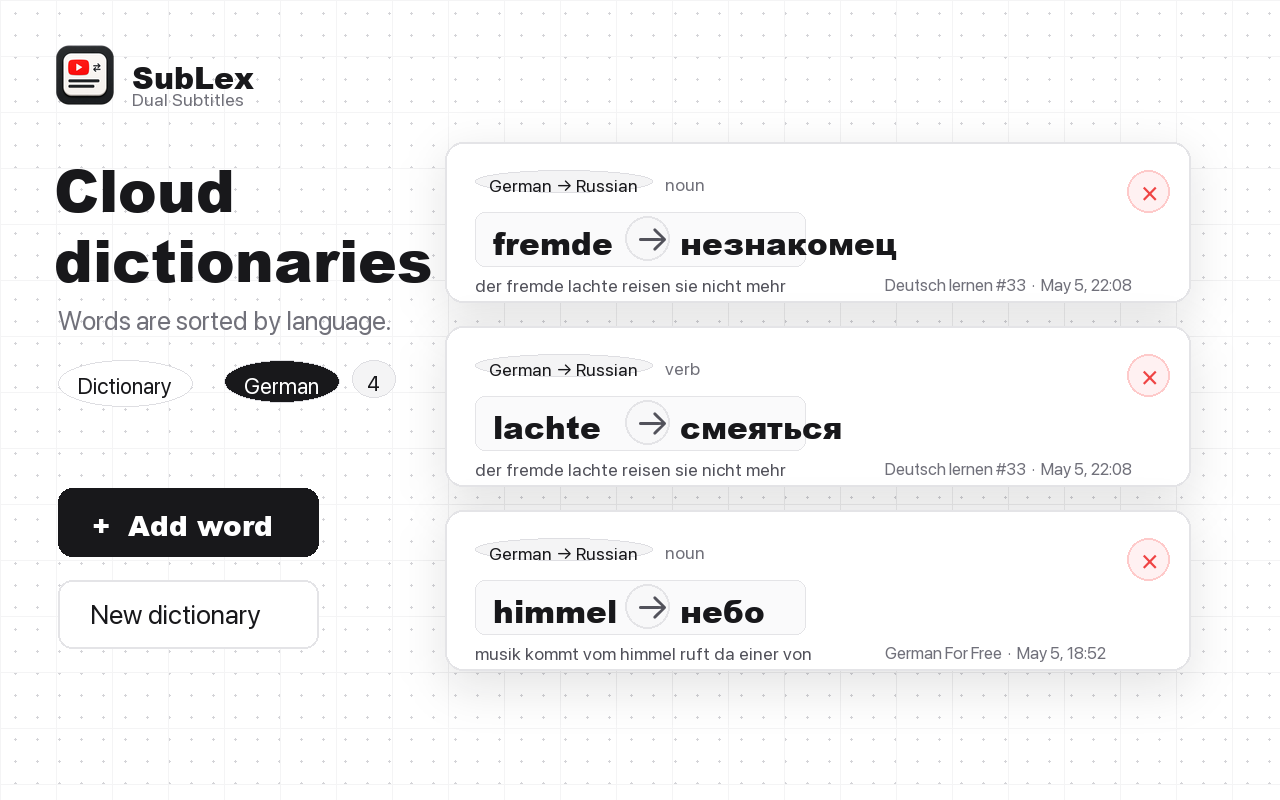
You can understand a word once and still forget it the next time. SubLex keeps the word, translation, sentence, and video context together.
YouTube vocabulary cards
SubLex turns useful subtitle words into a personal vocabulary workflow: hover, save, organize by language, and review with cards.
Stop losing words after the video
You can understand a word once and still forget it the next time. SubLex keeps the word, translation, sentence, and video context together.
From subtitle to practice
SubLex keeps the learning loop close to the YouTube video, then moves saved vocabulary into your personal dictionary and cards.
Use the tooltip button to save useful words while watching.
Words are grouped into language dictionaries, so German, English, French, and Spanish stay separate.
Practice saved words later instead of rebuilding word lists by hand.
FAQ
Yes. Hover a subtitle word, open the tooltip, and save it from the video page.
Yes. SubLex organizes saved words into language dictionaries automatically.
Yes. The website also supports adding words directly to existing or custom dictionaries.